This page is an archive of discussions from explain xkcd:Community portal/Technical. Note: This page is kept for historical purposes. Do not alter it except to archive new discussions.
I've changed MediaWiki:Helppage to point here. If we decide to have a local users manual or help desk, it should probably be changed. The default target was "Help:Contents". This also changes where the "Help" link in the sidebar points, so right now we have two different sidebar links pointing to the same place. --PhilosopherLet us reason together. 10:30, 1 August 2012 (EDT)
Update: I changed it to point to Help:Contents at mediawiki.org. The community portal is already linked from the sidebar, it was redundant to have two links there pointing to the same page. --Waldir (talk) 11:41, 7 August 2012 (UTC)Reply
Latest comment: 14 August 20127 comments3 people in discussion
Hey,
You might consider Extension:Comments. It acts basically like the comment system on the blog, so you could keep everything (article, comments) in one place. It's more conducive to casual conversation than the discussion page.
--Cyanfish (talk) 14:07, 2 August 2012 (EDT)
That's nice, but a simpler approach could be just to transclude the talk page in the subject page itself, as is done in the Wikipedia Signpost (see here for an example). --Waldir (talk) 16:15, 3 August 2012 (EDT)
Okay, that would work. The extension does have its advantages though - it's easier for new users (no markup), you can have upvotes/downvotes/"comments of the day"... It's a matter of preference, I suppose. --Cyanfish (talk) 22:27, 3 August 2012 (EDT)
Neither do I, to be honest. I just created {{Comic discussion}} to make things a little smoother, but from my experience, there will *always* be newcomers forgetting to sign, commenters confused about the best markup for indentation/replies, comments placed at the top rather than at the bottom, new comic description pages created without that template, etc. A proper commenting solution might be the best option for this. I just mentioned the transclusion option to let people know it was a possibility. Also, in the long run we need to make sure the wiki doesn't start looking like Wikia (blergh) if we start adding too many custom extensions. But a comment extension seems to be essential if we don't want to alienate the blog's community. --Waldir (talk) 17:06, 6 August 2012 (UTC)Reply
I'd like to suggest we add comments capabilities to the comics pages, since the discussion pages don't lend themselves to the kind of dialogue experienced on the blog. There appear to be several extensions that allow this, but I'm fairly new to the wikimedia stuff so I'm not sure how it would work, exactly.
That said, its demo looks rather simple. Extension:Comments seems to be a little more powerful (supporting replies, user pictures, voting, and maybe more). The only advantage of the Wordpress one is that it would integrate with Wordpress so extra accounts don't need to be created, but I assume most people who used to comment on the blog didn't have accounts anyway... --Waldir (talk) 19:58, 7 August 2012 (UTC)Reply
I'm not sure how to set it up, but if you could edit the robots.txt file to exclude the contents of Category:Noindexed pages? I've created a Sandbox for people to test the unfamiliar features in, and you're probably not going to want that indexed by the search engines. --PhilosopherLet us reason together. 08:47, 1 August 2012 (EDT)
Apparently you can edit it through MediaWiki:Robots.txt, but I'm not experienced enough to know what will happen if you block a url that runs through a .php page. (Perhaps nothing? Perhaps it blocks everything?) Is there any chance of moving the wiki to use /wiki/articlename urls like Wikipedia does rather than the current /wiki/index.php?title=articlename ? --PhilosopherLet us reason together. 10:43, 1 August 2012 (EDT)
/wiki/articlename would be great. Been trying to figure out how to make it work for days. Let me know if you know how. --Jeff (talk) 11:11, 1 August 2012 (EDT)
For URL rewritung, have a look at mediawiki.org: Short URL or for Apache. --SlashMe (talk) 15:49, 1 August 2012 (EDT)
For the record, what was installed was the Gadgets extension (which makes sense since Philosopher said the InputBox is not needed ATM). I had already brought the HotCat gadget, which should now be visible in the users' preferences for enabling. It was also necessary to create MediaWiki:Gadgets-definition and the description for HotCat so it could appear in the preferences page. However, it doesn't seem to be working... If someone can figure out what's wrong, we can fix it. One can test the script separately from the gadget system (so we can make sure it's not a gadget problem) by installing it as a user script, as I did in User:Waldir/common.js --Waldir (talk) 11:02, 7 August 2012 (UTC)Reply
Nevermind, the guys from the #mediawiki IRC channel helped me figure out what was wrong :) it should be working now and available to all users via the gadgets tab of the preferences page. --Waldir (talk) 11:41, 7 August 2012 (UTC)Reply
Yeah, that's where I found out about it, at least. I may not find time to implement it right away - I'm busy in RL at the moment. In the mean time, I've imported Popups from en.wikipedia. I haven't edited out the references to Wikipedia in it b/c I'm not quite sure which of them will break things or what to replace them with. --PhilosopherLet us reason together.04:23, 11 August 2012 (UTC)Reply
Anyone have any idea on how to import all of my posts from Wordpress into pages in the wiki? I can do it manually obviously, but I'd love to do it programatically. --Jeff (talk) 15:10, 7 August 2012 (UTC)Reply
I also realize that I won't be importing ALL the posts, just the ones that don't already have pages in the wiki already created. --Jeff (talk) 15:25, 7 August 2012 (UTC)Reply
SlashMe said (here): When we agree on a page layout, I can do this automatically. He's speaking about importing and creating pages for all comics programmatically. I don't know if he includes the explanations from your blog posts, though...
Also, do you think it could be a good idea to import, in the comic discussions here, the comments existing in the wordpress blog for comics prior to the wiki conversion? They obviously wouldn't be associated with wiki accounts, but we could get a copy of them here (with the dates, names, and also the +/- comment appreciation maybe...). Perhaps this could be considered once the idea of wordpress comments on wiki pages (as suggested here by DanB) is already settled.
I don't think I can import blog posts completely automatically, but maybe write something to make it easier. I'll have to look what is possible, but I'd say the least I'll need is an account for Wordpress.
Importing comments is similar: No promises, but probably difficult if not impossible. I'll have to see the comment system in the wiki. --SlashMe (talk) 17:06, 7 August 2012 (UTC)Reply
Importing all previous blog comments would be awesome. We could try a test installation of wordpress and a few test pages here on the wiki (it's easy to delete them if we screw up anything). In any case, I expect some manual tweaking to be needed if we want to convert the comments already posted on-wiki into comments of the wordpress plugin. It's definitely a challenge, but after all, we're xkcd readers, by definition we enjoy a good puzzle :) (and many of us are perfectionists who won't settle for a less-than-perfect solution :D). I say let's hack the heck outta that extension! --Waldir (talk) 19:48, 7 August 2012 (UTC)Reply
Sorry to the perfectionists, but regarding a less-than-perfect solution, could we include a link to the blog comments as a temporary stopgap? I've been using 1004:_Batman to try my hand at adding a comic, and I added a subtle link to the blog comments below the discussion box/transmutation. I'm thinking that link could be added programatically because we know how the blog structure is with year/month/date foldering. --DanB (talk) 17:11, 8 August 2012 (UTC)Reply
This wiki lacks automation, every time a comic comes out it needs to be submitted manually. A really simple way to do this is utilize xkcd's own JSON feed.
http://xkcd.com/json.html
If you download the latest comic json feed and edit it in notepad, you find all sorts of useful data like a complete transcript of the comic. --Jtorba (talk) 14:28, 7 August 2012 (UTC)Reply
Just experienced the following navigating the site...
Internal Server Error
The server encountered an internal error or misconfiguration and was unable to
complete your request.

Please contact the server administrator, [email protected] and inform
them of the time the error occurred, and anything you might have done that
may have caused the error.

More information about this error may be available in the server error log.

Additionally, a 404 Not Found error was encountered while trying to use an
ErrorDocument to handle the request.
Very strange, and not able to repro it, so it seems to have been transient. Just noting it here in case it happens again. I assume this is a hosting company hiccup.
BTW, while researching the above, I noticed that the explainxkcd.com domain registration expires in 3 days (August 10)... hopefully the bill has been paid; I'd hate for this site to go down; Grace Period and Redemption are a PITA... -- IronyChef (talk) 14:44, 7 August 2012 (UTC)Reply
Not sure what is up with them, but I've gotten some as well. It is either me messing with the site or the server creaking under pressure. --Jeff (talk) 15:32, 7 August 2012 (UTC)Reply
Can we install the "references" plugin so that we can use "ref" tags and add "references" sections to certain comics? I grant that it won't be as useful as on wikipedia, as most references are generally just wikilinks to wikipedia anyway, but I think it could be helpful. In editing the Black Hat article, I wanted to cite references to specific comics. I had to write them into the text because references aren't installed. If References do get installed, I'd like to also suggest a template for {{cite comic}} to create a quick and easy uniform reference to comics by number (or perhaps by name at the user's option?) TheHYPO (talk) 15:56, 7 August 2012 (UTC)Reply
It defaults (I believe) to citing in a 1.1, 1.2, 1.3 style; there's SOMETHING That lets you change it to the more familiar wikipedia 'a' 'b' 'c' style, which is easier to read, imo. TheHYPO (talk) 19:15, 7 August 2012 (UTC)Reply
Latest comment: 10 August 20123 comments2 people in discussion
Waldir already did some repairs to the {{comic}} template to keep it from sorting the Main Page into categories when the template is transcluded on the main page, but I see that other manual categorizations are still being transcluded (eg: the main page is currently categorized into category:Comics featuring Cueball. Is there a way to include the article without including its categories at all? TheHYPO (talk) 21:33, 8 August 2012 (UTC)Reply
That doesn't seem to be related to the {{comic}} template. Apparently the categories added manually to the comic page are getting to the main page. We can, for now, wrap them in noinclude tags. Maybe later we should create a {{category}} template that does that automatically. --Waldir (talk) 23:40, 8 August 2012 (UTC)Reply
I noted in that you'd already fixed the comic template. As I said, these were the "other manual categorizations". Noinclude would work, I suppose, but I do think we need to somehow fix that if the entire article is going to be included on the main page. TheHYPO (talk) 16:08, 10 August 2012 (UTC)Reply
Latest comment: 13 August 20124 comments3 people in discussion
I seem to be seeing some caching issues with images. I can't be sure if this will still be in effect by the time anyone reads this, but at the time of writing, File:United Shapes.png, for example, is still displaying as an older revision (even though it correctly states the filesize and resolution of the current version). Viewing the "full sized image" (http://www.explainxkcd.com/wiki/images/f/fc/United_Shapes.png) still displays that older revision, as well. However, if you add a question mark to the end of the full sized URL (http://www.explainxkcd.com/wiki/images/f/fc/United_Shapes.png?), the image is correctly purged and displays the correct image (although only with that URL, not on the file page nor where the image is transcluded). In other words, there's a caching issue.
I used to edit on some Wikia sites where they also had this issue, and it drove all the editors up the wall (particularly since it ended up affecting a good portion of images when updated, sometimes for as long as several hours). It was frankly quite frustrating when Wikia refused to do anything about that problem (part of the reason I don't edit there anymore). Is there any chance someone could look into this issue? I'm not sure what entirely causes it. OmegaTalk • Contribs01:58, 9 August 2012 (UTC)Reply
Aaaaand the image is updated (so the above example won't work anymore). The images definitely seem to be updating, but it's rather slow: at least a few minutes... OmegaTalk • Contribs02:00, 9 August 2012 (UTC)Reply
I think it might have to do with the Job queue. If that's the case, such updates will gradually happen as edits are made to other pages (each edit takes a job from the queue and runs it). But I'm not entirely sure that's what's at play here. --Waldir (talk) 03:28, 9 August 2012 (UTC)Reply
Don't know if this is related, but I'm noticing that thumbnails are displaying as red X's on alot of images - especially where I've noticed that editors have corrected the image title to lowercase in an article. One example is File:t-shirts.jpg and T-shirts - the thumbnails for the image history on the image page itself are Xs for me, as is the actualy comic on its comic page, which was at a reduced size. This isn't the only comic doing this. Hitler is as well, for example. TheHYPO (talk) 14:01, 13 August 2012 (UTC)Reply
Latest comment: 16 August 20123 comments2 people in discussion
I'm a big fan of List of all comics which I think is a great page and resource. Problem is, at least for me, the "create" button isn't working like it should. It's not preloading the {{create}} template as a starting template. If someone has time to take a look at that issue, I think it's a great idea. Is there any way that the preload could also somehow be passed the comic number, image name and comic name so the user doesn't have to reenter those? We should look into this. TheHYPO (talk) 21:15, 15 August 2012 (UTC)Reply
Ditto. There are a few refinements that I think could be made, though.
It's huge, taking a lot of time to load (tables tend to do that, I suppose) so perhaps breaking it into groups, even if it's on the same page (that is, separate tables for each hundred or fraction thereof) Breaking each into sections would allow a TOC for rapid navigation, too.
While it might be innocuous, the (create) link isn't needed for anything that isn't redlinked, so maybe an #ifexist, for when the pages do get created, the create no longer appears.
Hi, you should try to enable short URLs, which remove the ugly index.php from every URL. It makes navigation more intuitive and "wiki-style". It's actually quite easy to do: [1]
(Oh, and by the way, would you add WikiEditor? It's so beautiful :) [2])
Latest comment: 21 August 20126 comments3 people in discussion
Some of the larger comics are being scaled down to 800px wide. But MediaWiki apparently wants a discrete image rather than scaling what's been uploaded. Is there a plan to fix this? I hope I posted to the right section lcarsos (talk) 21:39, 16 August 2012 (UTC)Reply
Can you provide an article as an example, because I'm not sure what you mean here. What I have noticed lately, and maybe this is the same thing you're talking about is that any scaled image is not displaying and I'm not sure what the error is.
Basically, anything that's been scaled down, whether automatically by the wiki software (usually on File pages), or by people putting in widths into the comic template on comic pages so the images aren't obnoxiously large.
Latest comment: 24 August 20121 comment1 person in discussion
I'm noticing that aside from the image scaling issue (that I really hope someone is working on), I'm noticing that pages appear to be caching - I edited the latest article but my edits don't immediately show on the main page where that article is transcluded (as of this writing, I still see dead links on the mainpage to "Comics featuring Beret Guy" "Comics featuring Ponytail" because I forgot to add "Category:" to the wiki tag, even though I've already fixed the error in the article. TheHYPO (talk) 16:38, 24 August 2012 (UTC)Reply
Latest comment: 6 October 20122 comments2 people in discussion
Can the spam template be modified to also tag the pages as Category:Noindexed pages so that passing search engine robots don't think we're promoting those sites? I haven't leveled up enough in wiki-knowledge to be smart enough to do that on my own. lcarsos (talk) 21:38, 3 September 2012 (UTC)Reply
Apologies if this is already implemented, but just add <includeonly>__NOINDEX__</includeonly> to the template page. That's assuming the robots.txt for this website is set up to accept instructions from the wiki, of course. --PhilosopherLet us reason together.07:55, 6 October 2012 (UTC)Reply
Latest comment: 5 October 20121 comment1 person in discussion
It seems we've borrowed a number of templates and other settings that refer to "T" or "talk" for what is still called "Discussion" here. I suggest it is changed to "Talk" now, rather than change the references back to "D" and "discussion". Mark Hurd (talk) 11:44, 5 October 2012 (UTC)Reply
Latest comment: 5 November 20121 comment1 person in discussion
this guy has indicated that he has "added some interesting features to my toolbar, including adding a page template as a button" - it would be great to Add the {{create}} template code as a quick clickable button to insert when creating a new page for new comics... Can anyone with admin access to the site code add such a button?? TheHYPO (talk) 20:49, 5 November 2012 (UTC)Reply
I cannot, and as far as I know, no one else can. I suspect that this is related to the image resizing bug that we are also dealing with. But, as no one is working on that, there will not be a fix for this either in the near (or indeed the foreseeable) future. lcarsos_a (talk) 15:50, 20 November 2012 (UTC)Reply
Latest comment: 25 March 201317 comments5 people in discussion
I'm moving a thread that Davidy22 started on my talk page. The gist is, we need more people with server-side access (especially mediawiki-savvy ones) so we can properly deal with several issues that have been plaguing the wiki for a while now, most notably spam, but also the image scaling problem, a possible extension for proper comments, clean urls, etc. Below is the original thread, please comment. --Waldir (talk) 17:56, 25 November 2012 (UTC)Reply
Could you set the permissions so that all anon users have to pass a captcha to edit? The spam has gotten obscene, and they've stopped posting links, so our current detection mechanisms aren't working anymore. Davidy22(talk)08:21, 25 November 2012 (UTC)Reply
I would love to have the ability to tweak the wiki more thoroughly, but currently Jeff's the only one with server access. To be honest, I am not terribly familiar with server-side mediawiki management, so I haven't asked Jeff for access, but it's clear we can't be dependent on a single person to do all the mediawiki config (and Jeff probably knows even less about mediawiki than I do). Are you by any chance acquainted with server-side mediawiki maintenance? I think we could present a good case for having someone else with access to a dev/prototype instance of this wiki on Jeff's server so we could at least experiment and tell him exactly what needs to be done. Thoughts? --Waldir (talk) 17:40, 25 November 2012 (UTC)Reply
I agree that we need more people that are empowered to actively fight spam. I think that we ought to promote Davidy22 to administrator also, so that he can delete pages and block spammers/vandals as he notices them rather than letting them pile up until yourself, IronyChef, or myself notice that there's work that needs done.
What I think we should do is break out rights into more groups than simply administrator and bureaucrat. I think that's too big of a jump, and that there should be some gradiation. I think we should add a moderator (mark pages as patrolled and rollback ability (as much as it's a sledgehammer when you really only need a ball-peen hammer)) position.
I think we also need a spam fighter position, but that might not be possible to implement. It should be a position that allows the person to delete pages with 1 or 2 edits (page creation, marked as spam, maybe as high as 3 or 4 for the bots that repeat edit certain pages) and block users with 1 or 2 edits. The real problem there is how to grant those super-powerful abilities without allowing them to lose their mind and go crazy and destroy the wiki. Of course, if we don't catch it early enough there's going to be those IPs that manage to get to six edits, and those will have to be squashed by a full admin. We will also need a way of tagging those spam accounts so when a full admin passes by they will also know to ban the IP address after a spam fighter has deleted all the pages it created.
Finally, we also need a more active bureaucrat so that we don't have to bug Jeff to promote admin's as well as future moderators and/or spam fighters, and recognize bot accounts as bot accounts. We also should find someone knowledgeable to help Jeff (and maybe he has little helpers) to maintain the actual server. I've done some PHP work, but I've never touched anything deep inside a wiki (I like Ruby and Rails much more). This is my first time gaining admin status on a wiki, so I have no idea what the extra dials and levers do/mean. I look up on the MediaWiki manual and Wikipedia help pages things that I think should be possible, and often times pages exist in places about doing these things, but I'm nowhere near being called knowledgeable. After I finish up some IRL work I'm currently tied up in, I intend to set up a VM webserver on my computers and run a mediawiki install so I can learn how to work (and not break) things without putting explain xkcd in jeopardy.
From what I know, a moderator user group is possible, but not the spam fighter one. Then again, too many hierarchical levels may be too much for such a small body of regulars. Implementing the moderator group is easy, mw:Manual:User rights has the details (the "ninja" example and the "list of permissions" section should be enough for putting together the configuration commands to be added to the wiki's LocalSettings.php).
As for bureaucrats, I think it makes sense but it seems to me that Jeff only takes longer to perform changes that affect the server, as they understandably may take longer or be more complex (or break the wiki!). Bureaucrats' only difference from admins is that they can promote/demote other users, and this Jeff has been doing without delay, so perhaps there isn't a need for more bureaucrats at the moment. Please correct me if I'm wrong.
We do need more sysadmins (people with access to the server), though, for sure. This is a little tricky as none of us is comfortable enough to confidently make server changes in a mediawiki install. Jeff, how about putting the wiki in source control and giving two or three people access to it, so that any wrongdoings can be easily reverted? You could setup a git repository in the server and we could fork it locally to our machines, make tests and push the commits to the server repo whenever they're ready. --Waldir (talk) 17:20, 5 December 2012 (UTC)Reply
This is good stuff. I'm down with promoting more admins for spam fighting. If they screw stuff up we can demote them if necessary. I really haven't found a spam fighting extension that I think will be the best possible solution. I'll keep looking as it may be a combination of things. Server access is much more complicated as it is not even my server and it is shared hosting. I think that would be best to be accessed just by me. --Jeff (talk) 19:10, 19 December 2012 (UTC)Reply
Regarding the server, I understand -- your position seems reasonable. In any case, I've been looking for extensions that may help taking some workload out of server actions and make more stuff configurable via the wiki itself. I'll report back if I find something usable.
On another note, how do you feel about promoting more bureaucrats? I suggest Lcarsos who's been consistently active for the past few months. --Waldir (talk) 12:47, 4 January 2013 (UTC)Reply
Personally I'd kind of like to go and make some changes myself. Come up with a nice short url pattern and set it up. Upgrade the wiki. etc... Dantman (talk) 02:44, 23 March 2013 (UTC)Reply
The shorter URL is being looked into, although Mediawiki strongly advises against it. As for upgrades to the wiki, monetary donations towards Jeff so he can buy better bit for the server would be appreciated. Davidy²²[talk]03:06, 23 March 2013 (UTC)Reply
MediaWiki does not advise against it. Half the code currently running short URLs in core was written by me. Same for the new standard for rewrite rules in the new guides. And the tool to automatically generate the config needed to apply short urls to a wiki. Short URLs are not advised against.
We do however strongly advise against installing a wiki in /wiki. Because you do not want to create /wiki/$1 style paths while your script path makes scripts look like /wiki/index.php.
In this case my plan would be to move /wiki to /w then come up with some other short url pattern like /e/$1, some other path, or maybe /$1.
And setup some 301 redirects to redirect from the old urls to the new ones.
Ohwait, software upgrades. Uh. I knew you were talking about that. Yep. Definitely. The wiki recently had issues with running out of hard drive space, so that was all that was on my mind there.
I strongly support this. It's been far too long since we decided we'd want the short url scheme (/$1 seems like the best option since it would be simpler/cleaner and allow http://explainxkcd/1234 to point to the correct comic without any extra rewrite rules). While you're at it, I'm sure many would appreciate a look at the current situation with image resizing, which doesn't seem to be working for some reason. Installing Extension:Comments would be awesome, too, as well as Extension:Contribution Scores (live example). I'll ask Jeff to take a look at this thread. --Waldir (talk) 20:07, 23 March 2013 (UTC)Reply
Latest comment: 1 January 20134 comments4 people in discussion
I noticed that in Category:Comics all comics are sorted correctly by numbers; but not in any subcategory. (I didn't really get the explanation of how it works on the comics page.) How to fix this? -- St.nerol (talk) 10:40, 22 December 2012 (UTC)Reply
The comics template uses a template called num4 that turns the number in the comic number field into a four-digit number. That's then passed as a parameter to the category link, and the comics category page sorts articles by those four-digit numbers instead of their actual names. If we wanted to do the same for other categories, we would have to type them all out as [[Category:Politics|0200]], or whatever the comic number is. I would rather wait for mediawiki to come out with an in-built feature to solve this. Davidy22[talk]11:28, 22 December 2012 (UTC)Reply
Latest comment: 23 January 20132 comments2 people in discussion
I haven't been here (to edit) for a while, but have we still not addressed the bug that doesn't allow image resizing? I know most of us don't have access to that kind of lower-level coding on the site, but I think it's a bit of a notable issue that we can't display comics smaller than their actual size. TheHYPO (talk) 14:24, 21 January 2013 (UTC)Reply
Do you have any specific examples of this? By the way, using punctuation, capitalization, spell check, and complete sentences are more likely to get someone to help you. lcarsos_a (talk) 18:10, 23 January 2013 (UTC)Reply
Latest comment: 30 January 20132 comments1 person in discussion
Now that explainxkcd redirects straight to the wiki, could we take the /wiki/ out of the url? I'd also like the wiki's edit log to be purged to clean out the history and forget about past spam, but that's probably wishing for too much. Davidy22[talk]04:06, 28 January 2013 (UTC)Reply
Latest comment: 29 January 20135 comments3 people in discussion
Just created the my first page, 220: Philosophy, but I could use a little guidance. How do I find the date that an xkcd comic was originally posted, and how do I rig up the previous-comic and next-comic arrows on a page? (Actually, I've noticed several pages that should have the arrows but don't.) Ekedolphin (talk) 11:19, 28 January 2013 (UTC)Reply
Those arrows will automagically insert themselves when you make the adjacent comic explanations. There *is* a little backstage magic that needs to be taken care of, but we can do that for you. Davidy22[talk]11:40, 28 January 2013 (UTC)Reply
The comic template checks for the existence of the numerical redirect for the comic before and the comic after. If it finds the page to exist it will display the next/previous button as appropriate. So, by creating the redirects listed on the List of all comics (third column, only worry about the number and title links) future pages will automatically get the links created. Redirect pages look like #REDIRECT [[####: Comic Title]] and that's it (here is a link to the redirect page with redirect disabled so you can look at the source to see what I'm talking about). That's all that needs to exist on the number and title redirects. If you feel up to creating them yourself, feel free, otherwise someone else goes through occasionally and mass adds all the missing redirects. lcarsos_a (talk) 17:55, 29 January 2013 (UTC)Reply
Latest comment: 23 March 20133 comments3 people in discussion
I've been getting this error message a lot the last cup'o days. When trying to access a page; when trying to save changes on a page. Any ideas on why? I'm getting it on both chrome and firefox.
Database error
A database query syntax error has occurred. This may indicate a bug in the software. The last attempted database query was:
(SQL query hidden) from within function "Revision::insertOn". Database returned error "1142: INSERT command denied to user ::'dbo423085716'@'74.208.16.155' for :table 'text' (db423085716.db.1and1.com)".
Every once in a while I get a SQL error being reported, but usually I can simply F5 and the page comes up. Every once in a while it seems like the server load is just so that somebody gets lucky enough to see the server error out. I don't think there's much we can do about this, other than move the wiki onto a more powerful server. But, there are no ads on this site, there is no revenue model, just a very kind person paying for hosting that keeps this site up. I'm more than willing to overlook a few hiccups for the continuing availability of explain xkcd. lcarsos_a (talk) 07:12, 23 March 2013 (UTC)Reply
Yeah, I get those too, but St. Nerol was talking about something that happened recently with the server running out of hard drive space and throwing SQL errors every time someone tried to make large edits. I had to find Jeff on twitter because I'd get SQL errors when I tried to edit his talk page. He's looking into history deletion plugins, to clear out our vast archives of deleted spam and obsoleted prototype comic templates. Davidy²²[talk]08:10, 23 March 2013 (UTC)Reply
Install a caching reverse proxy to handle heavy load[edit]
Latest comment: 27 March 20134 comments2 people in discussion
According to returned headers, this server runs from Apache directly. I would recommend setting up a reverse caching proxy in front of Apache to handle high traffic load (like, e.g. current load). The one I use is nginx (http://nginx.org/) -- admins, drop me an email if you need help setting it up Fry-kun (talk) 21:38, 26 March 2013 (UTC)Reply
The standard software to use is either Squid or Varnish. Nginx is a bit too much of a webserver to be configured in the way MW needs iirc. Although nginx would help with serving the static assets. Unfortunately there will be a need to switch to a proper server first. The site seems to be hosted on shared hosting. Dantman (talk) 04:59, 27 March 2013 (UTC)Reply
I had gotten burned before with both Squid and Varnish but Nginx had always kept my systems alive. It's extremely lightweight and works great to fix these kinds of problems. But, of course if it's a shared server where you can't use it, it won't help... Fry-kun (talk) 16:35, 27 March 2013 (UTC)Reply
Nginx is a great webserver. It'll serve out static pages much better than Apache. But the issue here isn't the webserver. It's PHP and all the work that the database needs to do on every request. Switching webservers won't get rid of that issue. Using squid/varnish a proper reverse proxying cache will allow complete pages to be cached and served directly to readers bypassing the webserver, php, and the database entirely on some requests. That'll reduce the load the site has to cope with. Dantman (talk) 23:47, 27 March 2013 (UTC)Reply
Latest comment: 14 April 20133 comments2 people in discussion
I have "imported" {{disambig}} and the related category for the one page it was needed for (to avoid having a page that was uncategorised :-) ).
I have also created {{unsigned ip}} (and converted the one use of {{unsigned}}) and applied it for a handful of existing uses of {{unsigned}}. It hardly matters, but then it's also only three more characters to type for new uses.
Importantly, however, I implore you to consider including the second datestamp parameter when applying either template -- it's actually the more useful information. I know it's a pain to convert times back to UTC, but, hey, most of you don't have to deal with a half hour timezone :-) Mark Hurd (talk) 16:19, 13 April 2013 (UTC)Reply
Urrggh, there's an option to make UTC the default display time. The template oughta be a little more automated, mebbe filling the time in automagically with five tildes if no date field is entered? The time will be a bit off when editors fill in the unsigned templates, but it'll be close enough to the actual value. Davidy²²[talk]23:59, 13 April 2013 (UTC)Reply
No, especially while there's existing templates to adjust, where the "default" datestamp would be way out. If someone wants to fix a lot of the existing usage, setting their timezone to UTC is the simplest option. Mark Hurd (talk) 09:14, 14 April 2013 (UTC)Reply
I've removed "add a comment!" from Discussion heading[edit]
Latest comment: 15 May 20135 comments4 people in discussion
Sorry to bother you all, but I seem to have lost the password to this account and don't have an email set (which requires the password). I'm still logged in thanks to the "remember me" feature but after 30 days I'll lose access. This isn't fixable at the MediaWiki level; someone with access to the server mysql or whatever will need to change something. Is there such a person I can email with? Splainr (talk) 03:05, 15 April 2013 (UTC)Reply
I'm not sure how to solve that problem, but I know account usurpation has been done for the single-login transition in Wikimedia wikis, so technically it should be doable. --Waldir (talk) 23:04, 16 April 2013 (UTC)Reply
If the problem is lack of thumbnail generation, it should display correctly even without hotlinking, simply by using the original size, e.g.
I'm not sure why it doesn't. In any case, this image hotlinking thing reminded me, would it be a good idea to use the images hosted at XKCD.com and only upload variants to the wiki (e.g. those at Category:Helper comic images) and images Randall for some reason deleted from the server (e.g. images with typos)? This would reduce the load on the explainxkcd server and provide a better experience for viewers since xkcd is already optimized for high loads and actually openly provides the image urls for hotlinking. --Waldir (talk) 15:01, 21 April 2013 (UTC)Reply
Seeing as User:Daddy's upload has fixed the wiki always attempting to display the thumbnail version (which still don't work), I have disabled the "hotlinking" again.
Latest comment: 14 November 201314 comments6 people in discussion
It would be really cool if http://www.explainxkcd.com/<number> redirected to the explain page for that number. That would allow people to get to the correct explanation by simply adding explain to the comic url.
If you are willing to do this, all you would need to do (assuming you run apache with mod_rewrite enabled) is put the following in .htaccess in your web root:
RewriteEngine on
RewriteRule ^(\d+)/?$ /wiki/index.php?title=$1 [R,L]
There are several admins here (in fact, I am, too), but what you are looking for is the sysop, the one with access to the server. Admins can delete/protect/undelete pages and block users etc. Jeff is the only one that can change MediaWiki configuration or url rewriting... --SlashMe (talk) 17:08, 8 June 2013 (UTC)Reply
Thanks for your information, so I will try to talk to Jeff. BTW: Can you edit the main page? I still miss a link to the incomplete comics on the top.--Dgbrt (talk) 17:52, 8 June 2013 (UTC)Reply
At the top of the main page, there is a section that says "We have collaboratively explained 1189 xkcd comics, and only 33 (3%) remain. Add yours while there's a chance!". The word remain is already linked to the list. --SlashMe (talk) 19:16, 8 June 2013 (UTC)Reply
I was talking about the 97% comics. There are still many incomplete pages and we have a category here on that.--Dgbrt (talk) 19:36, 8 June 2013 (UTC)Reply
THANKS! I'm also not native English, I'm German. But this wiki is a great challenge to get more practice, even much more as if talking to common English natives.--Dgbrt (talk) 21:27, 8 June 2013 (UTC)Reply
This is something I want to do, so I'm putting this on my page, so I remember to add it to the .htaccess. I'm not super familiar with the .htaccess rules, can I have this along with the other rules I have in my htaccess file? --Jeff (talk) 15:17, 22 October 2013 (UTC)Reply
I've fixed this on our new host. (I actually had the rule in there already, I just had it in the wrong order.) I'd love to promote this feature a bunch. Any ideas how? --Jeff (talk) 02:33, 30 October 2013 (UTC)Reply
Latest comment: 11 June 20133 comments2 people in discussion
Is it possible to fix (or is there already) a way to add a motivation with the "incomplete"-tag? I tried {{incomplete|the title text needs explaining}}, which made "edit it" in the banner link to the uncreated page "the title text..."... ––St.nerol (talk) 12:16, 10 June 2013 (UTC)Reply
Thanks! I think that ideally most incomplete-notices shold carry a note on what's missing, but we aren't there, so this'll do for now. ––St.nerol (talk) 10:21, 11 June 2013 (UTC)Reply
Latest comment: 1 July 20132 comments2 people in discussion
I cannot edit this latest comic's page. When I hit edit a screen appears which says "This page has been protected to prevent editing." I've never edited before, but I'm annoyed by the improper use of the word candid. "It would be candid and unrealistic" would be better off in that sentence if candid was removed. How do I make it so I can edit the page, so I can remove this affront to the English language?
I believe you are trying to edit the main page. You can click "Latest comic" in the left sidebar or the "Go to this comic" button in the top right corner of the grey box to go to the actual page for today's comic. Davidy²²[talk]16:42, 1 July 2013 (UTC)Reply
Latest comment: 25 October 20132 comments2 people in discussion
On iPad and iPhone browsers, the banner ads obscure the top of the page. This covers up some of the useful buttons up there, like LOGIN for example. The workaround is to refresh the page. Because the banner ad is the last thing to load, you have a brief window of maybe three seconds to find and click the link you need. Gardnertoo (talk) 20:24, 26 July 2013 (UTC)Reply
javascript:var match = window.location.href.match(/\d+/);
var suffix = match ? '?title=' + match[0] : '';
window.location ='http://www.explainxkcd.com/wiki/index.php' + suffix;
If you're on a numbered xkcd page, it will go to the accompanying explainxkcd.com page automatically. If you're on the xkcd.com home page, it goes to the explainxkcd.com wiki home page. Mattflaschen (talk) 17:30, 19 August 2013 (UTC)Reply
To add this bookmarklet to your browser:
Copy the bookmarklet javascript (*not* the decoded version)
Using your browsers bookmark manager, create a new bookmark
Give the bookmark a meaningful name -- e.g. ExplainXKCD
Paste the javascript in for the bookmark URL
Save.
( -- Tomh (talk) (please sign your comments with ~~~~))
Database error
A database query syntax error has occurred. This may indicate a bug in the software. The last attempted database query was:
(SQL query hidden)
from within function "SqlBagOStuff::set". Database returned error "1142: INSERT command denied to user 'dbo423085716'@'74.208.16.155' for table 'objectcache' (db423085716.db.1and1.com)".
Sidebar ad overhangs content in Firefox 25.0[edit]
Latest comment: 18 November 20136 comments4 people in discussion
The sidebar ad on each page overhangs the content frame slightly when I view this site in Firefox 25.0 on a Windows 7 Home Premium 64bit pc. I have started Firefox in safe mode with all add-ons disabled and it still happens. Site looks fine in IE 11. 173.245.56.79 (talk) (please sign your comments with ~~~~)
Have you tried hitting control-shift-R, or clearing your cache? That sounds like Firefox is disregarding part of our CSS for whatever reason. I'm running a very similar setup and I'm not getting these problems. Try giving it a wee bit of time and trying again. Davidy²²[talk]17:27, 13 November 2013 (UTC)Reply
The sidebar has a fixed width defined at the CSS style sheet. Press F5 or CTRL-R to reload this style sheet. This happened to me in the past too. --Dgbrt (talk) 19:14, 13 November 2013 (UTC)Reply
Sidebar ad overhangs content in DuckDuckGo 7.67.1.2 for iOS 15.4.1, on iPhone 12. aka 'Your sidebar ad has been crushed into a cube. You have fifteen minutes to move your cube.'
Latest comment: 11 February 20207 comments4 people in discussion
Whatever the new hoster does cost, you should get your money back. Sometimes the page doesn't load at all, or the menu is missing after the browser did finish after one or two minutes. The performance here is still annoying. That cloud seems to be a dead cloud. --Dgbrt (talk) 23:33, 11 January 2014 (UTC)Reply
It's easily more performant than our old service, and it holds up far better to traffic. I am inclined to say that it's a region specific issue, and I'll submit a ticket for that, but they've worked far better than flat shared hosting for the time that we've been using them. Davidy²²[talk]00:01, 12 January 2014 (UTC)Reply
More detail: The message is an Error 522 (Connection timed out).
I'm having still major problems to connect, only this this silly error message. ...and then it does work again. Still strange.--Dgbrt (talk) 22:58, 14 January 2014 (UTC)Reply
Today I've been getting a lot of these errors with Cloudflare. (London-based CloudFlare, in my case.) "Error 522 Ray ID: 2587581d8b8a350c • 2015-12-21 23:25:22 UTC" is just one of the IDs. Not sure if you'd prefer another bit of the page info, instead, but the Ray ID looked unique enough to pinpoint debug info in the background.) The suggestion is made that the web server is too busy at something or other. Anyway, just so you're aware.
I had a look here, first, to see if anyone had mentioned anything (and found the above), so apologies if I'm not posting in the best bit of the best page. 162.158.152.22723:44, 21 December 2015 (UTC)Reply
It seems to be an occasional regional issue that cloudflare has with us. When I go to our server directly our site is still up, so something between us and cloudflare is failing. Not sure what though. Davidy²²[talk]03:40, 22 December 2015 (UTC)Reply
Yesterday (and day before?) Cloudflare London insisted that the server was not responding. Not sure if that was an actual explain-server issue (not seen mention of it anywhere else, in a brief dig), only Cloudflare London being refused by the server (detecting and blanket filtering rogue traffic via my gateway) or some other issue. Meant to check for update timestamps on the latest comic article that coincided with my being unable to visit the site at the time. But FYI, assuming the cause isn't already sorted out with no further actions needed and/or possible... 162.158.155.9216:02, 11 February 2020 (UTC)Reply
That's something we're working on, but current limitations with our provider are making things sow for us. When they give us what we need, we can do it. Davidy²²[talk]16:59, 29 January 2014 (UTC)Reply
Latest comment: 3 March 20144 comments3 people in discussion
Current and latest comic page, 1337, unusually has a "Next" before there's even any 1338 page. (It points to 1337.) As a lowly IP, I don't feel I ought to delve too deep to see if it's a page template issue (possibly because "1337" is both a past title and the current number, maybe, although not too sure if that'd work out) or just because of manual editing. But bringing it to general attention. (It may of course be an issue that does not even last beyond Wednesday, and comic number 1338's arrival, even without intervention.) 141.101.99.713:40, 3 March 2014 (UTC)Reply
D'aww, and I wanted to be lazy too. I'll get to fixing it, an IP took it to himself to add stuff to the comic template and he removed the auto-hiding buttons. Imma fixy. Davidy²²[talk]17:42, 3 March 2014 (UTC)Reply
I did revert some edits on that issue here, so for the first point it should work again. In general: The main page should not be affected like this and the test environment is called: Sandbox. --Dgbrt (talk) 20:43, 3 March 2014 (UTC)Reply
The issue was fixed three hours before your autorevert. This is getting excessive. The next time you autorevert a large edit without testing or making an attempt to fix things yourself, expect a three-day ban. Davidy²²[talk]22:41, 3 March 2014 (UTC)Reply
Confirmation emails? What, are we a five-star hotel now?
Jokes aside, is this a thing you really need? You should be autoconfirmed after editing for a while without getting blocked, but if you can put forward a good reason why we should add this in, I'll do it. Davidy²²[talk]00:54, 21 March 2014 (UTC)Reply
Not blocked! Trying to authenticate my email, which I thought was an automatic process. Does that feature not work? That would certainly explain the lack of autoresponse.... Cheers. KB Karenb (talk) 01:35, 21 March 2014 (UTC)Reply
I'm having the same issue. I've requested several confirmation emails over the past few days. I have also tried changing and then resetting my email address. Nothing has worked so far, and it's not in any of my filtered inboxes. I can edit most pages. Will this fix itself even if I don't get an email? DownGoer (talk) 18:16, 26 June 2023 (UTC)Reply
Because the people visiting here are probably the people that should see this[edit]
Latest comment: 24 March 20142 comments1 person in discussion
After the server upgrades mentioned in the sitenotice, de.explainxkcd.com should exist. I'm not publicizing it yet, just want to get it up and work out implementation details before it goes fully live. Pls dun test during the downtime, there'll be plenty of time for that after it's live. Davidy²²[talk]01:14, 21 March 2014 (UTC)Reply
Ok, so our server doesn't actually have the required dependencies to complete the upgrade, so that was slightly fruitless. Sorry about any downtime or inconvenience caused, I didn't add the German wiki again because I'm looking set up the parallel wikis on an up-to-date base. Sorry again for any inconvenience that may have caused, I'll make sure to be better prepared next time, and maybe actually succeed in performing the upgrade next time. Davidy²²[talk]02:02, 24 March 2014 (UTC)Reply
Does anyone have image of Black Hat saying to Cueball "It's 'cause you're dumb" ?[edit]
Latest comment: 16 April 20143 comments3 people in discussion
Guys, does anyone has this image?
I'm hosting Russian xkcd fanpage here - vk.com/xkcdoff and if someone would post it it would be very helpful. --KOTYAR (talk) 22:40, 24 March 2014 (UTC)Reply
I actually can't find it either. Shame, I liked that old thumbnail. I could probably photoshop up a new version if you really want one though. Davidy²²[talk]04:53, 26 March 2014 (UTC)Reply
expxkcd is actually a thing that user user:grep was so kind to purchase and handle for us. I can forward this on to him for him to resolve, and give him the rewrite rules we use if he needs them. Davidy²²[talk]11:12, 16 April 2014 (UTC)Reply
Yeah, the reason for that is that right now, I update it manually, which is obviously a really bad idea. I plan to change this pretty soon. I don't want it to go to the main page because the main page doesn't show the discussion, and comes along with all the other, regular main page stuff. Any rewrite rules wouldn't hurt, Davidy22. greptalk12:04, 16 April 2014 (UTC)Reply
Hrm. Ours rules point towards the main page. We have no automatically updating page that always redirects to the latest comic, but you can use Mediawiki hooks to append the contents of the page Template:LATESTCOMIC to the end of our URL. Davidy²²[talk]23:44, 17 April 2014 (UTC)Reply
Sorry, I don't understand. My BOT will upload the next comic on time, unless it's some new chaos by Randall a BOT just can't handle. The LATESTCOMIC template is updated and so it seems only be an issue on that damn Cloud Service Cache. Even Randall's pages are affected. At "What-if" I still have to use <CTRL+R> to get the latest content. --Dgbrt (talk) 00:26, 18 April 2014 (UTC)Reply
That is an interesting idea, however I just made a script that automatically adds 1 every Monday, Wednesday, and Friday. I could have it grab the number from your page and do this once a day at something like 00:10 EST (because Randall sometimes does things on other days), that's a possibility as well (other times / intervals may also be done if you wish/want). greptalk04:34, 02 May 2014 (UTC)Reply
Our LATESTCOMIC page and Randall's xkcd json page should both have up-to-date comic numbers for you to pull. Ours is probably the better one to pull since your site is linking to us. Davidy²²[talk]06:30, 2 May 2014 (UTC)Reply
The script now checks Template:LATESTCOMIC every 30 minutes to see if the comic has changed or not. If you wish, I might be able narrow this down to 11PM->6AM (for 30 minute checking) and then have it check every two hours at other times or something similar to that (if systemd.time has a way to do it) greptalk12:13, 09 May 2014 (UTC)Reply
I still do not see that problems. Please touch this wiki as less as needed, this is still the best choice. But there is still a big problem on the cache, an update on a picture lasts many hours. Some statements in "LocalSettings.php" should work, if not this wiki version is buggy. Problems should be solved at the cause and not be overridden by some additional scripts. --Dgbrt (talk) 21:51, 9 May 2014 (UTC)Reply
We have ample bandwidth for a bot that only checks once every half-hour. The image caching issue is irrelevant to the current topic. Davidy²²[talk]03:45, 10 May 2014 (UTC)Reply
Nice :) But is this update a preparation for an upcoming update to one of the latest versions, or are we limited to 1.19 for some reason? I'm asking because 1.19 is only supported for a few more months, and also because with newer versions we'd have access to some niceties -- for example, after version 1.20 the PAGESINCAT magic word accepts parameters, which would allow the count of explained comics in the main page to work using less hardcoded hacks. --Waldir (talk) 16:08, 27 July 2014 (UTC)Reply
Prior attempts to update the wiki have been prevented by the realization that Lunarpages doesn't give us quite as much control over our server share as we thought we had. Checking again, they seem to have upgraded the version of PHP on our server since we last attempted and failed to run one dumb update script, which should mean that it'll work next time we try it. The wiki also has quite a bit of user effort invested into it now, and I'm a little less ready to jump into .0~.3 releases than I would normally be on my own machine, so I upgraded down the LTS path that I knew would be safe. After the first ill-planned attempt, I've been eyeing the 1.23 LTS line for the next major jump, but I'm certainly not stepping into it while it's still relatively fresh. Davidy²²[talk]17:08, 27 July 2014 (UTC)Reply
Just wanting to offer, I use ARP Networks for hosting, you should check them out if you want more control. 173.245.56.154 (talk) (please sign your comments with ~~~~)
It wasn't me that posted that comment. But surprisingly enough anon and I have the same first two bytes in our IP addresses. Congrats on the version upgrade. lcarsos_a (talk) 05:31, 29 July 2014 (UTC)Reply
Why does the site say I'm blocking ads when I'm not? I do use AdBlock Plus, but it's turned off for this site. Screenshot here. And while I'm here, that "unblock us" text has an error- the first "and" in the second sentence shouldn't be there. NealCruco (talk) 01:51, 29 July 2014 (UTC)Reply
The text only appears when the ads fail to load. The error message actually says noscript, which means that the Javascript that the ad box uses to fetch images isn't running. How long has this been happening for you? Davidy²²[talk]04:35, 29 July 2014 (UTC)Reply
I am genuinely puzzled. The message tells me that something is causing your browser to fail to load/run the Javascript that makes the ad render and report stats, so the problem could be anything that can cause that: noscript, outdated browser, experimentation. I don't know anything about your setup, and it works on my test machines, so I can't tell currently what's wrong. Davidy²²[talk]03:10, 1 August 2014 (UTC)Reply
Annoyingly, the spaces that are giving you trouble can't be changed because they're text string inputs, and Mediawiki has no regular expression markup yet. Every other instance of formatting-critical spaces has been changed to non-breaking spaces though, thanks for the heads up! Davidy²²[talk]18:13, 2 August 2014 (UTC)Reply
I think I fixed this by adding a space between the buttons. Unfortunately, this only works as long as the comic is not as wide as the button bar. I guess this is because of the surrounding table. --SlashMe (talk) 20:15, 2 August 2014 (UTC)Reply
Latest comment: 28 August 20143 comments3 people in discussion
I've forgotten my password, and password reset is not working for me. I went to Special:PasswordReset, and had it send me a reset email. However, I have not received the email. I am sure that I have an email associated with my account, and it's confirmed. 173.245.54.17408:38, 18 August 2014 (UTC)Reply
I checked in Gmail in "Mail & Spam & Trash", and it still doesn't find it. I tried a fresh reset, so we'll see if that comes through. No luck after a minute or two. 108.162.216.7104:59, 28 August 2014 (UTC)Reply
Set the threat level threshold way up. Any further steps into cheap botnet territory. For your security, you may want to reconsider the nodes through which you're operating through. Also, why do you need to use Tor to visit us? Davidy²²[talk]04:17, 14 September 2014 (UTC)Reply
Ah, okay, thanks, now I'm not getting the captcha. As for why I'm using Tor, I don't need to, but I'd rather do so just to be anonymous. I wouldn't have written if it were just your site, but since Cloudfare has made captchas the default setting for Tor, the internet is starting to become near unusable. So that everyday people aren't scared away from using Tor due to the perceived complexity of daily browsing, whenever I have to enter a captcha, I try to contact someone at the site to ask them to change the setting. 108.162.216.8206:52, 14 September 2014 (UTC)Reply
Plans to upgrade only include LTS releases. That said though, the recent and unintentional server downtime was actually the result of a setup for a coming mediawiki upgrade, among other things. The plan is to upgrade to 1.23 sometime in the coming months, during the weekend after a satisfactory number of bugfix releases. We're very interested in setting up translations, although mediawiki in it's current form already supports translation; the extensions you linked are mostly quality-of-life additions. It's been delayed because the plan is to eliminate all incomplete comics first so that translators have a solid base to work from. Davidy²²[talk]02:42, 12 November 2014 (UTC)Reply
Latest comment: 6 November 20159 comments4 people in discussion
explain xkcd is using Cloudflare which recently enabled HTTPS for all users, but when accessing it via HTTPS it returns error 521.
In order to fix this in addiction to the solution steps proposed by CloudFlare check if SSL settings are correct. 173.245.52.138 (talk) (please sign your comments with ~~~~)
HTTPS is working now, there just some mixed-content warnings, mostly on style tags which being active mixed content are blocked, but it's still a good improvement as it's possible to have more privacy when browsing explain xkcd. 188.114.99.35 (talk) (please sign your comments with ~~~~)
Whoever has server access, can they try changing $wgServer (Manual:$wgServer) to use a protocol relative url? As the manual page says, you may also want to set $wgCanonicalServer to a fully-qualified url (hopefully defaulting to https). Behrat (talk) 04:17, 29 October 2015 (UTC)Reply
Much better! The styles and scripts are loaded now, and the page looks good. It's still not completely green https because it's loading some images over plain http, but my browser at least appears to be allowing them for now. If you want any more suggestions on technical issues, let me know. I currently maintain my own mediawiki installation with full https, cloudflare, and short urls. Behrat (talk) 20:27, 4 November 2015 (UTC)Reply
I can reproduce in Firefox. This is due to the mixed content blocker. Usually, it should only block active content (scripts) and maybe warn about passive content (stylesheets), but at least in Firefox, it is configurable to block both. But I cannot see why the stylesheets shouldn't be served via HTTPS.
Latest comment: 12 January 202516 comments4 people in discussion
When attempting to access the feed for this wiki I'm told "Sorry. No feed found." Is there some way that the feed can be restored to the satisfaction of Feedly? Could it be due to some validation issues, or should I consider changing my news reader? Pmw57 (talk) 23:08, 7 January 2015 (UTC)Reply
Huh. The feed updates automatically with a script that I wrote a while ago, I'm very sure it passed more than this the last time I checked. Fixed a few things, left the one about the date because that's a pain to fix, and one that I can't figure out for the life of me. I think I fixed the line that was causing the actual problems though. Should update on feedly now. Davidy²²[talk]01:52, 8 January 2015 (UTC)Reply
Hallelujah - the feed was mixed in with other geeky material and it only took me nearly 8 months to notice that nothing was coming through from here anymore. I'm premature with my thanks though. The RSS link in the navigation pane to the left still doesn't want to be understood by Feedly. By contrast, other feeds such as for latest changes can be picked up. Pmw57 (talk) 02:04, 8 January 2015 (UTC)Reply
Could it be that it's just not valid XML? I see that it ends at line 236 with </item> with no other closing tags, for example. Pmw57 (talk) 03:18, 8 January 2015 (UTC)Reply
Ohwait a minute, the auto updater rips old entries off the bottom and that's where there's supposed to be a closing channel and RSS tag. well. Davidy²²[talk]07:19, 8 January 2015 (UTC)Reply
It's good to know that the cause is now known - I'll let you (or someone else with the authority) get on with fixing things up :-) Pmw57 (talk) 07:46, 8 January 2015 (UTC)Reply
My reader has been refusing to process the feed for the last few days. I finally un-busied enough to poke into why. When I looked at the source at /rss.xml I saw:
</item>

<item>
	<title>1561: Water Phase Diagram</title>
	<link>http://www.explainxkcd.com/1561</link>
	<pubDate>Thu, 06 Aug 2015 21:51:11 -0700</pubDate>
	<guid isPermaLink="true">http://www.explainxkcd.com/1561</guid>
	<description><![CDATA[<h2>1561: Water Phase Diagram</h2><p><a href="http://www.explainxkcd.com/1561">http://www.explainxkcd.com/1561</a></p>]]></description>
</item>
What on earth is happening here I don't even know. The script seems fine, I repaired the RSS file again manually. See if it malfunctions again today. Davidy²²[talk]01:22, 10 August 2015 (UTC)Reply
Script is behaving very strangely. Today's update warped the feed file in a weird way, this doesn't usually happen. I'll test it on my machine to see what's happening. Davidy²²[talk]13:56, 10 August 2015 (UTC)Reply
Alright, I figured out what was going on with the feed. There was a bit of code I had in the update script that trimmed off the last entry of the RSS file and when I recreated an empty file for the feed after the inexplicable wipe, I forgot to turn it off so it was still shaving off the end of the file. This time it should be working. Davidy²²[talk]07:34, 12 August 2015 (UTC)Reply
The RSS feed is broken again, when I open RSS feed link in firefox I get
XML Parsing Error: not well-formed
Location: https://explainxkcd.com/rss.xml
Line Number 71, Column 18:
	<title>3028: D&D Roll</title>
------------------------^
adding this regex to the script that generates the RSS file should fix it:
Fixed it myself. Just use template "Infobox character 2" instead of "Infobox character" when the character's category serves as it's own info page.--17jiangz1 (talk) 14:55, 31 March 2015 (UTC)Reply
Comic 1505 (30 March 2015) isn't properly showing up, I think?[edit]
Latest comment: 30 March 20152 comments2 people in discussion
Excuse me if I'm being a n00b, but 1505 is posted, and the page is extant, but it's not showing on the Main Page yet. Is this supposed to happen, i.e. waiting for someone to put some content on the page, or did something break somewhere...? Again, sorry if I've just committed a massive derp. 173.245.56.18904:38, 30 March 2015 (UTC)Reply
On that note, they made a similar template that links to rationalwiki, but didn't use it at all in any pages. Huh. It's not even a very significant site. Davidy²²[talk]05:52, 6 April 2015 (UTC)Reply
...and then continues with a working rest of the page. (Also snipped, but this time both before and after. I've kept it short while imagining I've given enough to ID the precise breakpoint though.)
Same problem encountered when using "Next" link from 1544 or "Previous" link from 1546. Page http://www.explainxkcd.com/wiki/index.php/List_of_all_comicsitself suffers the exact same error. (Last wgVariable listed in LoaC page is "wgSearchNamespaces":[0], instead, but still similarly ends after apparently the same close-script and open-script flagging point.)
Does not go wrong in Mozilla-based browsers also on this machine (Firefox, Seamonkey). Page sources for 1545 look exactly like the above 1544 snippet, as expected, with no obvious funny characters or 'Little Bobby Tables' anomalies, SFAICT. In case it's a spurious downloading error that has ended up being cached, I've also "shift-refreshed" in my browser to force download.
Utterly Baffling me, but FYI in case it's something someone needs to know about, although I'm hoping it's just local strangeness and not anything actually of significance.141.101.98.25204:33, 5 July 2015 (UTC)Reply
Nothing I was previously familiar enough with to spot an adverse effect. Note that http://www.explainxkcd.com/wiki/index.php/1545:_Strengths_and_Weaknesses - the link I tried to get from the LoaC page (but only just now tried in non-IE!) works perfectly. Even while the "/1545" (i.e. 'RedirectedFrom') version of the page continues to be truncated. I can only assume that (despite attempts to force things anew), it's buggily-cached iteration.
Hang on, that gives me an idea. Which works. I changed the 1545 page (change labelled as "Troubleshooting" in history) and... it opens perfectly. Removed change (should probably have self-reverted, in hindesight, but suspect it'd be fixed anyway) and no further issue. "List of all Comics" page still as broken (because I haven't forced it to update, and am not inclined to 'interfere' with it), but I shall check again after 1547 forces its own changes upon it. Otherwise, consider this closed. Sorry to bother you.
Ok, FYI, once 1547 'Solar System Questions' finally appeared, I check "List of all comics" page. First of all a lot of "Waiting for page..." (uh oh), but then force-refreshed page (in the way that didn't work previously) and it loaded correctly. C'est finis. 141.101.98.25215:02, 6 July 2015 (UTC)Reply
Latest comment: 2 August 20152 comments2 people in discussion
With this content:
Database error
A database query syntax error has occurred. This may indicate a bug in the software. The last attempted database query was:
(SQL query hidden)
from within function "SqlBagOStuff::set". Database returned error "1114: The table 'objectcache' is full (db423085716.db.1and1.com)".
Latest comment: 28 December 20244 comments4 people in discussion
Hey it looks like there's an issue with the rss feed, when you browse to the url on the right it just displays an empty page, not sure what's going on. Eluvatar (talk) 14:19, 3 August 2015 (UTC)Reply
Huh, in the last few hours the rss file was inexplicably wiped. I've restored the base of it, the bot should start populating the feed with new comics, but old ones are gone. Davidy²²[talk]16:49, 3 August 2015 (UTC)Reply
2024-12-18 - RSS feed broken
Hello, My apologies if this is the wrong way to get your attention:
The RSS feed has a missing semicolon. This happened a few weeks ago, and I'm sorry I'm only commenting on this now. -- /pjfayer at gmail dotcom 172.69.130.56 (talk) 14:40, 28 December 2024 (please sign your comments with ~~~~)
Might be related to the problems caused by the recent "D&D" (and not "D&D") titles filtering through. Which is something I believe is already demanding a 'fix', so is either just part of that being solved (however long it takes) or can be added to the "As and when you can fix it..." suggestions. (See more recent header-sections here, amongst others, rather than this 2015-based one.) 172.68.205.12318:06, 28 December 2024 (UTC)Reply
✓Done - It was because 0 was created, so the logic that #ifexist:0 should be false failed. I changed it to default to -2 when number is not present, which will work as long as no one creates -1! Mark Hurd (talk) 11:15, 14 September 2015 (UTC)Reply
Latest comment: 19 October 20152 comments2 people in discussion
After checking the Discussion tab to make sure there was a Discussion, I thought that someone had removed the {{comic discussion}} tag, and went into full-page edit to put it back. But it's there. Maybe it's just me, maybe it's just temporary, but FYI in case it isn't. 141.101.75.18515:06, 19 October 2015 (UTC)Reply
Latest comment: 7 December 20165 comments5 people in discussion
Captcha not appearing at all. Can't edit pages without turning off security settings (which were set to default). Chrome and "Edge" on Windows 10. Both yell at me about some components of the page being insecure. 15:48, 18 February 2016 (UTC)
Slight bug in the editing panel, when asked what webcomic we're talking about, it cannot be in all caps, it must be strict lowercase, despite appearances on xkcd.com. Could someone take a look at it? 108.162.249.15800:54, 5 November 2015 (UTC)Reply
It took me several months to figure out that "this wiki" is named "explain xkcd" and not "explainxkcd". I spent those months answering two questions every time the "what's this wiki's name" question appeared (when I missed the answer, a different question appeared).--Jojonete (talk) 09:06, 5 November 2015 (UTC)Reply
Latest comment: 8 November 20155 comments3 people in discussion
As co-header (right-margin hugging text) to the Discussion section on all pages (or at least as many as I've just visited - and on multiple browsers, just in case...) I'm getting the following, with the <>-tags being my own descriptive additions:
<redlink>File:comment.png</redlink> <validlink>add a comment!</validlink> ⋅ <redlink>File:Icons-mini-action refresh blue.gif</redlink> <validlink>refresh comments!Discussion</validlink>
Looks like the PNG and GIF files concerned have been removed, or the links in the Discussion template broken/incorrectly redirected.
(Sidenote: The character between the "add a comment!" and the "File: Icons-mini-action refresh blue.gif" that I've copied here verbatim (so doubtless appears correctly for everyone else who reads this) is an 'I don't have this character on my machine' character, for me, which is obviously entirely my fault for not downloading additional fonts that I'd need. From cursory investigation, it appears to be essentially the same as "·", Alt-0183, or HTML code '·', which would render on my machine and yet (if changed) shouldn't break on those where it currently works. For your consideration, but not as vital.)
141.101.106.16106:30, 7 November 2015 (UTC)Reply
ETA - Delving around further, Category:Pages with broken file links seems to indicate it is a widespread problem at server-side, and not somehow solely my own (except for the Sidenote issue!). And suggests a simple way to check that the issue is fixed (when suddenly the category is nowhere near as 'full'), and then discover any related ones that might need fixing (like the special Star Trek Into Darkness alternate version of the Discussion template). 141.101.106.16106:57, 7 November 2015 (UTC)Reply
Latest comment: 3 March 20163 comments2 people in discussion
The text above the posting captcha says “type the two words” but reCaptcha often doesn't use two, and they're often not words. Example: http://i.imgur.com/TdM5n5O.png
Maybe we could change it to something like “type the text”?
So, the reCAPTCHA captchas are entirely provided by Google. If there's an error in it, it's likely Google's fault and a bug report should be sent in that direction instead. Davidy²²[talk]00:23, 3 March 2016 (UTC)Reply
I noticed that before. It's not a bug in recaptcha, but rather in ConfirmEdit, file ReCaptcha/i18n/en.json to be exact. --162.158.90.217
Latest comment: 17 May 201614 comments8 people in discussion
It doesn't look like any of the site's CSS is loading for me. I have tried purging, adding useskins to the URL, and clearing my browser's cache, and webpage content remains in Times New Roman with no special styling. Headers and bold spans of text are bold, list items are bulleted, buttons are button-y, templates and my signature display with HTML-style-attribute-level CSS, and so on, but that's the extent of it. Is this a belated April Fools' joke, or has something gone horribly wrong between the servers and my eyes? ~AgentMuffin
I made a similar post earlier -- it seems to have vanished down a black hole. I linked these screenshots: [5][6]
There are actually still ads, they're just shoved right at the bottom of the page. mysqld is clocking in at 40% cpu load, and mediawiki seems to be going into fallback mode and skipping stylesheets which is about what I'd expect from an april fools comic. Davidy²²[talk]01:31, 5 April 2016 (UTC)Reply
Well, perhaps you don't need another note about this, but I noted the 'stylesheetless' appearance myself, just now. Except that it is styled, partially. (When I choose to view by Style "No style", it's even more not-Styled!) Could be because a subset of styles aren't being loaded (so that the ones that are still loaded can only be identified from their enforced absence), but looks like you have this as much in hand as can be expected, so just FYI... 141.101.98.13704:13, 5 April 2016 (UTC)Reply
Have you tried switching the server off and back on ? ;-) Jokes apart, are there really so many users continuously polling ? It could be just a case of stale open connections. Really, a reboot might not hurt (although it may kill-off few sessions and you may get some angry posts, but at this point, it might be worth the try) Edit: Sorry, I was messing up the formatting while replying. I'm trying to fix it. But at this point, does it really matter? :P 162.158.255.5604:21, 5 April 2016 (UTC)Reply
Alright guys, still having trouble with the load, but I've put a quick temporary hack in place to get the css working again for now. Fonts are a little off, I'll deal with that soon. Davidy²²[talk]08:09, 5 April 2016 (UTC)Reply
Did a little more work on things, styles should be working again but it's not great on the back end. I'm going to do some rooting around to see what went wrong. Davidy²²[talk]00:07, 6 April 2016 (UTC)Reply
Cool.. This is pretty good. We're almost there.. The only things I can notice that are off are - (1) Category list at the end of the page (2) Contents block at the beginning of the page and (3) Edit buttons for individual sections. By the way, I'm curious, what exactly was broken ? I didn't expect you'd have to fix things here. I expected that since the issue was caused by excess server load, it would return back to normalcy automatically once things settle down a bit in couple of days after the offending comic was more or less explained. 162.158.255.5603:32, 6 April 2016 (UTC)Reply
A script responsible for picking user preferences and integrating css from pages like Mediawiki:common.css was failing to complete because of server load, so I gave it a helping hand and just had it insert a static stylesheet instead. I almost certainly missed a few spots though, because the wiki does not look right. Davidy²²[talk]04:43, 6 April 2016 (UTC)Reply
(resetting indent) Yes, things are still off. The text "Jump to: navigation, search" is at the top of every page, but it's useless because it links to stuff already at the top of the page. Edit summaries aren't italicized, the edit boxes don't use the whole window width, links are underlined, section edit links are too big, etc. I put the Wayback Machine to good use, and found the below set of archived pages, all using the proper style. Compare them with the current appearances of the pages, and you should see most, if not all, of the issues I've seen. Main Page | My contributions | The "edit" page for comic 1486 --NealCruco (talk) 21:50, 7 April 2016 (UTC)Reply
Is here nothing to be done about the missing styles? The tables still look horrible and there is not help when editing, for instance for signature etc. Colapsing of tables etc. also won't work which is a mess for some of the long explanations and tables Kynde (talk) 11:56, 18 April 2016 (UTC)Reply
Latest comment: 1 June 20162 comments2 people in discussion
You know, the buttons that look like the ones on the xkcd site. Shouldn't they also highlight like the xkcd site? I thought maybe it was due to the above CSS issue, but the links to archive.org make it seem like it's just never worked.
It just seems to me that, if we're going to go that far in mimicking the actual buttons, we should probably also mimic their a:hover settings. Shut off the box shadow, change the background to white, and the link color to #6E7B91.
I've tested the following CSS, and it appears to work:
Latest comment: 18 July 20163 comments3 people in discussion
For about an hour, I wasn't able to edit a page or create an account when I was trying to, because the captcha was missing. I'm not sure if it was problem on this site or captcha but I thought I'd mention it.
--Anqied (talk) 08:34, 11 June 2016 (UTC)Reply
I'm not certain this is the same issue, but I was just having a problem with the captcha for unregistered users trying to edit a page. I figured out that it's because you were trying to serve the captcha through HTTP even though the page was on HTTPS, so my browser was blocking the captcha. Changing to HTTP "fixed" the issue, but that shouldn't be the solution. 108.162.215.18716:45, 18 July 2016 (UTC)Reply
Latest comment: 4 July 20203 comments3 people in discussion
My edition was attributed to 141.101.104.60, whereas my real address is 88.156.226.213 according to [7]. Wikimedia sites (Wikipedias, Wiktionaries...) recognize my IP address properly. Someting strange is going on here. 141.101.104.7122:40, 21 June 2016 (UTC)Reply
Just a heads up that your website is incorrectly identifying the IP address of visitors as being from the CloudFlare server that is serving the page content to them. It would be best practice if you could explicitly look for the field "REMOTE_ADDR" rather than "X-FORWARDED-FOR" as the former is unaffected by the use of intermediate proxies.
PS My IP address should begin with 131.111. IP addresses beginning with 141.101 belong to Cloudflare London. 141.101.98.521:08, 21 July 2016 (UTC)Reply
FYI I just created this account and the "email address confirmation" email I received said the account was created by a Cloudflare IP (162.158.107.199), not my own. ExcarnateSojourner (talk) 15:09, 4 July 2020 (UTC)Reply
Latest comment: 4 March 20184 comments3 people in discussion
I am not a registered user (I just haven't bothered to make an account), so I have to complete a Captcha before saving any of my edits. However, I've found numerous times that the captcha does not show up when I hit [Save page]. The line of text introducing it ("To help protect against automated edit spam, please type the word you see in the box below:") shows up, but the no actual captcha and thus no saved edits. Is this a known issue with Chrome? I managed to circumvent it by using IE (I assure you, it was the only other browser available), but I would much prefer to be able to edit explain xkcd pages in Chrome, my usual browser. 108.162.220.17 (talk) (please sign your comments with ~~~~)
I just figured out the problem and successfully edited a page. I too tried IE after Chrome but still encountered the issue... to my consternation I noticed a new icon in the address-bar, 'Blocked content'. (Apparently recaptcha is treated similarly to a pop-up.) Interacting with this new button made the captcha appear. I am in Chrome adding this comment, and after finding the similarly-functioning/corresponding button here, all is well 108.162.237.24718:39, 2 August 2016 (UTC)Reply
Hmph, I am likely a completely different user from the foregoing, but our IP addresses are similar and both reported as from Cloudflare in TX. 108.162.237.24718:42, 2 August 2016 (UTC)Reply
I would like to address this and also point out this is the only site where I've run into this problem; other wiki-based sites can load captcha fine. According to Chrome it's blocked because it's an "unsafe script". 141.101.107.8408:54, 4 March 2018 (UTC)Reply
File:John Cage and Michael Bach in Assissi 1992.jpg
I could not find why they were deleted and it's hard for me to argue for their presence in the articles. Being a newbie here, I would like to ask those who knows better to either undelete files, or upload them again, or delete file mentions from the explanations. Thanks --Ата(talk)15:47, 8 August 2016 (UTC)Reply
I tend to clean up after myself, don't recognise these file names. I believe these happen when files get moved, feel free to cut dead file links wherever you find them if you find them unnecessary.Davidy²²[talk]02:38, 10 August 2016 (UTC)Reply
Latest comment: 18 August 20162 comments2 people in discussion
See 1721#Trivia. Randall has accidentally named both 1721 and 827 "Business Idea". He fixed it by renaming 827 to "My Business Idea". I tried to reproduce by renaming the file and wiki page for 827, but it now shows the old comic on both pages. Maybe CloudFlare caching? And idea (that's not a business idea) to fix this? --SlashMe (talk)
Cloudflare takes a little time to update changes to an image. For immediate results, you can create an image under a different name and use that while you wait for the old one to update. Otherwise, it should update within a few hours. Is it good for you now? Davidy²²[talk]14:48, 18 August 2016 (UTC)Reply
I've accessed this Wiki on my mobile device more often than previously and I couldn't find any discussion about this. Honestly, 50% of the reasons I'm adding this topic is about the discussion, the rest is about making it easier for people with narrower screens.
I understand that I am a new member on this Wiki and that altering Mediawiki:Common.css has site-wide effects (and I'm sure that there are some templates that won't agree with some of the options we have, even some tables, such as the one on 893: 65 Years#Trivia, will break a very narrow design).
OK. Let me just ramble on about this, then. =)
There are some obvious (but not necessarily easier) options for mobile devices. MediaWiki lists a few Skins and Extensions. Not having ever had access to a Wiki's server, I have no idea how nerve-racking that is (or if it even makes sense for this Wiki). Even more obvious to some - and even harder to implement - is a mobile app (that I wouldn't use anyway).
So, to bridge the time until maybe something more effective comes along, we could try to add some CSS ourselves. I'm no expert. But here are my thoughts.
This is about all devices with narrow screens, not just phones. Let's say anything under 600px width is considered narrow.
Most obviously, the font size should be affected. This has negative consequences for anything with fixed font size. And anything we forget. Basically, the sidebar, the search and anything else on top of each page can be massively smaller depending on the screen and fixing that won't be as easy.
Of course we could disregard the sidebar, or rather, push it to the bottom (which is easy, it's artificially placed on the left instead of the bottom). There are a number of reasons why a lot of people wouldn't want that. One of those reasons is that the ads would basically disappear for anyone who doesn't scroll down. We would have to figure out where else we can put it, on the top maybe. On the plus side, we could have the entire width of the screen just for the article.
Another thing that breaks the design regularly: comic images. We could make them fit. The navigation might be more challenging.
There's a whole lot of paddings and margins to get rid of.
Maybe make the search box a lot bigger?
A short snippet for the comic images and for the font:
@media handheld,screen and (max-width: 600px),screen and (max-device-width: 600px){ /* because some mobile browsers like to work with a higher resolution than the resolution of the screen */

#bodyContent{
font-size:initial; /* resetting font to full size */
}

td > img{ /* maybe add a class for the table in Template:comic */
display:block;
margin:auto;
max-width:100%; /* make image fit into box */
height:auto;
}

}
HTTPS Links Back to XKCD Interfere with Random Button[edit]
Latest comment: 10 February 20172 comments2 people in discussion
(I've moved this from "Proposals" to here, now realising this is the proper location.)
The Links back to the comics that are present just above the comic itself on the wiki pages (and adjacent to the next and previous links) provides an HTTPS link back to XKCD. However, this interferes with users who want to click that link, and then click random - because c.xkcd.com does NOT support HTTPS, and thus clicking random after returning to xkcd from explainxkcd via the button on a comic's article does not work. These links should be switched back to HTTP.
What makes you suspect c.xkcd.com does not support SSL? It features a perfectly valid wildcard certificate from GeoTrust (currently valid from Dec 14 00:00:00 2016 GMT, so it should already have affected you), although it's different from the multi-site certificate from Fastly used on the comic and what-if.xkcd.com and, yet again, different from the Let's Encrypt ones used on the blag and store.
On the other hand, there is a compelling argument for HTTP links: Most interactive comics break with HTTPS. –TisTheAlmondTavern, 14:19, 17 January 2017 (UTC)
I can't reproduce the issue with random comics, but the benefits of using SSL for links to a site that stores no user data probably don't outweigh the issues that some people seem to be having. Changed. Davidy²²[talk]22:34, 10 February 2017 (UTC)Reply
"Retry for a live version" and stuff not responding[edit]
Latest comment: 5 January 20171 comment1 person in discussion
Every now and then, I'd just be browsing around the site, then all of a sudden I'd run into an issue with it saying that there was an error with the explainxkcd.com host and that I would need to wait for the servers to restart. This is happening rather often for me, but goes away quickly. Sometimes, it happens on my own wiki pages too... weird. Other times, things would just freeze. Is it something on my end, or is it with the site? --JayRulesXKCD (talk) 14:05, 5 January 2017 (UTC)Reply
Latest comment: 9 March 20177 comments3 people in discussion
I live in the timezone PST, and because of that, the clock seems to be ahead of my time by about 7 hours and 40 minutes. Can someone add support for different timezones?
For example, at my time of posting, it is 7:56 PM on March 8, 2017. The time the wiki thinks it is is shown on my signature: 625571b7-aa66-4f98-ac5c-92464cfb4ed8 (talk) 03:40, 9 March 2017 (UTC)Reply
You can actually set your own time zone. Go to Preferences->Date and Time, and there should be a time offset option for you to pick your time zone. Davidy²²[talk]07:36, 9 March 2017 (UTC)Reply
Oh, the timestamps recorded in signatures are in UTC for everyone. That doesn't change, because it makes it easier to follow the timeline of a conversation in a talk page. Davidy²²[talk]17:24, 9 March 2017 (UTC)Reply
Uhhh, the timestamp isn't UTC at all. My latest BOT upload was 06:02, 8 March 2017 CET or 05:02, 8 March 2017 UTC and it is recorded here as 04:45, 8 March 2017. So we still have an offset 17 minutes to the past. That's an old problem.--Dgbrt (talk) 18:33, 9 March 2017 (UTC)Reply
And even if you don't like me for this: The server time is currently UTC-00:17 and not UTC. This odd offset confuses users. But I know nobody can change this.--Dgbrt (talk) 19:36, 9 March 2017 (UTC)Reply
Hello,
I tried to reset my password today, but there is a problem with your mail-server: The sender-adress of your password-reset-mail is [email protected], but the (sub-)domain vps.explainxkcd.com does not exists, and so the eMail is rejected by my mail-server (and most others too). Could that please be fixed? Thank you very much. --DaB.
Latest comment: 25 May 20182 comments2 people in discussion
I was just about to add some photos of the ISS transiting the sun to today's explanation, but saw that it's no longer possible to just enter the names of Wikimedia Commons photos and for them to render. I know of at least one explanation—1400—that previously had such images, but now just has redlinks. I presume that at some point someone must have disabled $wgUseInstantCommons in the config settings. May I ask what the reason for that was? And is there any chance that that could be reverted? Obviously there aren't a lot of articles where it makes sense to have Commons images up, but IMHO it's a useful feature to have for the rare occasion where it makes sense, like with today's comic. PinkAmpersand (talk) 21:20, 24 April 2017 (UTC)Reply
Solved. You now can embed pictures from Commons like local files. The link [[File:DBCooper.jpg|thumb|Cooper]] shows the picture from Commons because it doesn't exist here. There is no need to use a template. --Dgbrt (talk) 23:57, 25 May 2018 (UTC)Reply
Latest comment: 20 August 20171 comment1 person in discussion
I am a fervent believer in encrypting everything (I am the crypto nut in 1269: Privacy Opinions), and have configured the NoScript plugin to force the use of HTTPS instead of HTTP for all sites that aren't on a special list in my configs. Hence, I tend to visit sites on HTTPS that most people visit on unencrypted HTTP, discovering all the bugs in people's HTTPS implementations in the process...and this site is not exempt from the bugfinding.
In order to edit pages, you need to enter a CAPTCHA. However, the script that makes this captcha work is fetched from Google over unencrypted http (the src tag in the script specifies http: not https:). When I visit this site over HTTPS, the use of active content served over unencrypted HTTP onto an encrypted page causes Firefox to have a spasm and block the script. Since Google fully supports HTTPS, the script's src tag should just be changed to say https: instead of http:, and that SHOULD fix it. Better yet, omit the protocol at all, and do something like:
src="//www.google.com/recaptcha/(rest of url)"
Most modern browsers will interpret that as "fetch www.google.com/recaptcha/(rest of url) over the same protocol used to serve this page."
(Sadly, NoScript is not smart enough to fix this by itself and just change the script's src to https: client-side...)
I do intend to update the CAPTCHA, I got the email notice from Google. I've been away from the site for longer than I'd like, been busy but it looks like a bunch of stuff has piled up while I was gone. I'll try to fix what I can with the time I have. Davidy²²[talk]03:38, 12 November 2017 (UTC)Reply
10 days left. I wonder what happens then. Right now, it just says "V1 SHUTDOWN ON 2018-03-31" and expects me to type it as an answer. 172.68.110.46 (talk) (please sign your comments with ~~~~)
Either the kludge of simply typing the message about shutdown still works, or the Captcha system is just not working: I'm not autoconfirmed here but I was able to edit today, 9 days after v1 presumably went "poof". Yngvadottir (talk) 18:12, 9 April 2018 (UTC)Reply
The new reCAPTCHA v2 is now online. I apologize for the delay but many updates were required and I tried to keep the server downtime as short as possible. Dgbrt (talk) 12:53, 19 May 2018 (UTC)Reply
Latest comment: 15 August 20182 comments1 person in discussion
I can't make any edits to the comic pages because the captcha simply doesn't appear when I'm trying to edit the comic pages. -- WilliamBrennan (talk) (please sign your comments with ~~~~)
Hi & Thanks heaps! I finally created an account after years of pleasurable & enlightening explanations. It took me over 5 minutes to get past the Captcha, and I've seen a few in the last week registering for sites such as XDA-developers and the like. Not sure how it all works but it feels like it's set to "ultra-difficult" or some-such...and this is the place where things are *easy* for *stupid people* like me ;) Cheers & thanks again -- Munchywok (talk) (please sign your comments with ~~~~)
The Captcha is from Google (Big Brother...) and based on an sophisticated software in which you sometimes even don't have to solve it at all when it is convinced that you are a human. But it depends on your browser installation, especially your add ons. My best experience is using Google Chrome without any extensions. Firefox with extensions is the hell. --Dgbrt (talk) 09:25, 15 August 2018 (UTC)Reply
Latest comment: 19 May 20181 comment1 person in discussion
I've noticed Randall has been making the comics higher resolution to look good on HiDPI/Retina displays. But the copies on ExplainXKCD are the old low resolution copies.
Perhaps we'll have to go through at some point and update these? 162.158.75.58 (talk) (please sign your comments with ~~~~)
I am aware of this. Randall started to provide two different resolutions at standard comics more than a year ago, and he also provides the larger resolutions to older comics since than. Technically the image tag provides links to two pictures and the browser decides based on the screen resolution what is shown. Since this wiki is now at the latest version the use of $wgResponsiveImages may be possible. But this has to be tested first. Stay tuned... Dgbrt (talk) 12:53, 19 May 2018 (UTC)Reply
Latest comment: 20 October 20188 comments3 people in discussion
Not sure if this has been mentioned before, but shouldn't the HTTP urls be redirecting to HTTPS? Right now, the HTTP and HTTPS endpoints seem to have different login states, which is possibly confusing. I was stumped for a long time on why I couldn't login to my account, because I kept getting the error message "There seems to be a problem with your login session; this action has been canceled as a precaution against session hijacking. Go back to the previous page, reload that page and then try again." And then I noticed the "Use secure connection" button, and when I clicked it, it took me to the HTTPS site where I was already logged in! But even now, if I go to an HTTP url, I'm still logged out there. Ahiijny (talk) 00:43, 21 August 2018 (UTC)Reply
Of course HTTP and HTTPS are different endpoints. Login via HTTPS and your credentials are encrypted and this will be never converted into plain text for HTTP. And I just successfully tested both connections with Google Chrome. Maybe we should redirect always to HTTPS like xkcd does, right now it's just your choice. --Dgbrt (talk) 14:46, 21 August 2018 (UTC)Reply
Ah, I see. If I log in from the HTTP site, I'm logged in on both the HTTP and HTTPS sites. But if I login from the HTTPS site, then I'm only logged in on the HTTPS site, and not on the HTTP site. Furthermore, if I'm logged into the HTTPS site and I try to login from the HTTP site, I get the error message that I quote from above. Fair enough.
I guess one contribution to my confusion was the fact that the HTTPS site doesn't have the green padlock in Chrome. That would have made the difference between the HTTPS and HTTP site a bit more obvious. (I rarely type in the entire URL directly; I usually just let the Chrome address bar autocomplete do its job... and unfortunately that autocomplete takes me to the HTTP site, and I keep forgetting about that.) Right now, on any HTTPS page here, Chrome still says that it's insecure: "Attackers might be able to see the images you're looking at on this site and trick you by modifying them." Firefox says something similar: "Parts of this page are not secure (such as images)." Perhaps someone should look into that? (I think it might be the ad image.) Ahiijny (talk) 03:09, 23 August 2018 (UTC)Reply
Thanks for your remarks. I'm aware of this but the site isn't insecure, only a few local images and some from wikimedia are hard coded to a http link. It's not much so I'll fix it soon.
It took some time to find all the places of hard coded images via http (insecure) but now you should see the green secure remark in your browser when logging in via https. --Dgbrt (talk) 13:50, 24 August 2018 (UTC)Reply
I just had to solve the "select all street signs" Captcha at least 10 times in a row. I never know when/whether to include slivers, backs of signs, sign posts, walk/wait lights. Captcha already doesn't follow my definition of street sign (I only call the sign that has the street name a "street sign", but I realize what I call "road signs," Captcha also calls "street signs" and I can adjust for that. But I haven't figured out the other issue yet, and I suspect Captcha is dinging me on choosing slivers. But that's only a guess, since it never tells you what you got wrong, it just gives you another Captcha. -- Thisisnotatest (talk) (please sign your comments with ~~~~)
My advice is installing Google Chrome and it works fine. Since that Captcha software is also from Google (Big Brother...) I believe that's on purpose. Firefox is the hell as you described; I'm not sure how it works at MS IE/Edge. In general you have to select not less than three and not more than four squares. But on Firefox, even when it seems definitely to be correct, the chance of getting an error message is more than 80%. You probably use FF. Nonetheless right now there are no other adequate Captcha tools supported by Mediawiki, the software this Wiki runs on. --Dgbrt (talk) 12:57, 27 August 2018 (UTC)Reply
I second this. Big Brother's Captchas on Firefox are nearly unsolvable (granted, I'm browsing with JS off and blocking 3rd party cookies). And recaptcha requires 1) JavaScript and 2) a connection to google. //gir.st/ (talk) 12:23, 10 September 2018 (UTC)Reply
New user don't have the rights. Do some more edits and wait a few days until you can create new pages. Your user page is created by me for now. --Dgbrt (talk) 15:00, 28 September 2018 (UTC)Reply
Good Question! is there some place that everyone [who is cool] can find, that explains how many edits one has to do (and/or, how long one has to wait) in order to cause the
[...] but you do not have permission to create this page.
[error] message to ... "no longer" appear, when some limitation or rule is no longer blocking or "preventing" allowing creation -- by that user -- of his own "User:" page? (OR ... of her own "User talk:" page?)
I have done very few edits here, but ... a couple of them were almost 3 years ago.
For what it's worth (FWIW), I did not plan to say much on my "User:" page here. Probably something like:
Latest comment: 5 November 20182 comments2 people in discussion
[First post - hello, everyone!]
I have 15 years of experience of using MediaWiki, and have been heavily involved in some of the accessibility work on Wikipedia.
When we use colons (:), semicolons (;), and asterisks (*) to indent dialogue, discussions, etc we actually cause MediaWiki to generate HTML lists.
If we leave a bank line between indented lines/ paragraphs, we cause the start of a new HTML list.
Since the start of each list is read out by the kind of software used by (for example) people with severe visual impairments, this generates barrier to their use of the site.
The solution is to not leave blank lines; to always indent replies by just one step; and to maintain consistency in the type of character used.
Thanks for your input and welcome here. At first you should know that this Wiki doesn't follow every Wikipedia standard, but there is a --relatively new-- FAQ and we should talk at that discussion page about any enhancements. And please consider to keep it short, a typical editor here isn't a Wikipedean and doesn't read tons of manuals.
There are many ugly layouts here, most written before the FAQ did exist, but when I and others see them the explanation or transcript gets an incomplete tag for that reason. And the biggest problem in the past was the use of overwhelming tables.
@Lupo, no honest comment will be removed here, even if it should be posted at the Miscellaneous section. @IP, the proper internal link is here: title text, and I see that this wiki needs a simple page to explain all the terms and characters used in a general short way. --Dgbrt (talk) 19:43, 12 November 2018 (UTC)Reply
Latest comment: 3 June 20205 comments4 people in discussion
I get the following MedaiWiki exception on some of the pages:
MediaWiki internal error.

Original exception: [0beebcc3efaec7ded86aea14] 2018-12-05 23:25:16: Fatal exception of type "MWException"

Exception caught inside exception handler.

Set $wgShowExceptionDetails = true; at the bottom of LocalSettings.php to show detailed debugging information.
Also having this. Seems to happen when “math” in Preferences-Appearance is set to “MathML with SVG or PNG fallback (recommended for modern browsers and accessibility tools)” DrMeepster (talk) 08:01, 8 December 2018 (UTC)Reply
New error: If that math option is set to “Latex source” than an error relating to the page-ruining setting replaces any latex code: Failed to parse (MathML with SVG or PNG fallback (recommended for modern browsers and accessibility tools): Invalid response ("Math extension can not find Restbase URL. Please specify $wgMathFullRestbaseURL.") from server "invalid":): <LATEX CODE HERE> DrMeepster (talk) 07:50, 11 December 2018 (UTC)Reply
I think you posted this before the "new robot" comic came up? keep in mind that the number 404 is not linked to any comic. (There is an explain page for 404, but no comic 404. Therefore it is actually 1 comic less than you might think based on the number. On the other hand there are I think 2 or 3 additional special comics (not numbered), such as the latest entry to the 5 minute comic series, or the one about open source, etc. Lupo (talk)
I posted after it came up. I know about the unnumbered comics, so assumed they didn’t count, but I always forget about 404. Accounting for the non-comic, all seems right in the world. Thanks Lupo. “That Guy from the Netherlands” (talk) 14:01, 26 March 2019 (UTC)Reply
Latest comment: 14 May 20191 comment1 person in discussion
Hi, I'm working on a project focused on docs, and wondered if there's some API or database I can access to pinch some of the tagging info from this site?
Even something like Randall's /json.html data from each page would work. User:Toonarmycaptain (User talk:Toonarmycaptain forgot to sign this edit at 03:50, 14 May 2019 (UTC)Reply
Latest comment: 11 July 20193 comments2 people in discussion
In 1467: Email, there are two links in the title text that should be normal text. It has happened several times in other pages, and it's annoying. How do I change links like that into regular text? Herobrine (talk) 07:41, 11 July 2019 (UTC)Reply
Not sure what you mean. Maybe it is a browser issue on your end? on my computer neither chrome nor internet explorer or edge interpret anything inside of "My New Year's resolution for 2014-54-12/30/14 Dec:12:1420001642 is to learn these stupid time formatting strings." as a link... Lupo (talk) 08:00, 11 July 2019 (UTC)Reply
Latest comment: 8 November 20191 comment1 person in discussion
I've been experiencing some problems when trying to solve captcha when posting comments and topics. It's gotten much harder than before, I fail a lot more often, and occasionally, when I finish it, it reloads the page with an "Incorrect or Missing Captcha" error, and forces me to retry. Has anybody else experienced this problem? Am I the only one with Captcha issues? Has it been working properly in recent times?108.162.241.24418:40, 8 November 2019 (UTC)Reply
Latest comment: 10 January 20202 comments2 people in discussion
The bot seems to have been down since December 13, 2019, and Dgbrt hasn't made a single edit since March, 2019. He hasn't responded to the comments in DgbrtBOT's talk page, either. Is there any way for an someone to contact him? Herobrine (talk) 13:12, 1 January 2020 (UTC)Reply
Latest comment: 1 January 20201 comment1 person in discussion
Google seems to have changed something in AdSense again, and the ads have been appearing in random positions again since December, 2019. This page might have a solution? Herobrine (talk) 13:20, 1 January 2020 (UTC)Reply
Links to xkcd pages sould be withoult "www." part[edit]
There is an issue with loading resources on pages, that are opened with "www." part in URL.
For example commic 1975.
If viewed from https://www.xkcd.com/1975/, comic is not interactive. On the other hand, https://xkcd.com/1975/ works like a charm.
Access to fetch at 'https://xkcd.com/1975/alto/root' from origin 'https://www.xkcd.com' has been blocked by CORS policy: No 'Access-Control-Allow-Origin' header is present on the requested resource. If an opaque response serves your needs, set the request's mode to 'no-cors' to fetch the resource with CORS disabled.
I just registered, and can't seem to edit/create my own userpage. I've been editing MediaWiki wikis for a very long time and it's currently part of my career, so I'm pretty sure I'm doing everything right. Is there a prerequisite number of edits or something before I can create my userpage? Equazcion (talk) 22:18, 6 April 2020 (UTC)Reply
I do not know the answer to that, but ... if one of us finds out "sooner" than the other, then, let's "share" the answer. Yours might appear here, and mine ... might appear about eleven "sections" up, in this same "Technical" portal ... at the URL in the section "Cannot create a user page." (see the DIFF listing...)
Maybe I should have "seconded the motion" here, instead of adding my own question, -- which is very similar! -- to a different section, up there? Pardon me ... --Mike Schwartz (talk) 08:15, 7 April 2020 (UTC)Reply
Yes, according to that page, your account must be at least one week old, AND you must have made at least 10 edits. There's a new page, explain xkcd:Autoconfirmed users, which says it's three days (rather than one week) and 10 edits – after that, you become an "autoconfirmed user", and gain the right to create pages (among other things). – Yfmcpxpj (talk) 02:01, 29 September 2020 (UTC)Reply
The List of all comics and the full list are incomplete, stopping with 2289. Taking a look at List of all comics (full) nets that it belongs to the category 'Pages where template include size is exceeded', so I'm assuming it just hit the limit. I'm sadly not well versed in MediaWiki, so I have no idea what a workaround would look like
not sure what causes this but i tested in chrome (incognito mode to avoid extensions), old edge (not chromium) and chrome iOS via mobile data. all test had the same result.
This problem seems to be common to all comics ending with a question mark: 2236, 2138, 2065, 1841, 1205. My best guess is that the url is being interpreted as a query, but since there is nothing after the question mark this results in an error. Whether this is a new error or just hasn't been noticed before I don't know. Renaming the pages without the question mark could work, but would require every reference to these comics on the wiki to be updated. AlChemist (talk) 10:07, 22 June 2020 (UTC)Reply
i think it is new, i recently (not sure when but after 2138 was released) went through the Code Quality series using the links and it worked fine then. i don't think it is being interpreted as a query because the question mark is encoded. i would amazed if it would still interpret this as a query because that would completely defeat the point of encoding the url in the first place. TomW1605 (talk) 09:35, 22 June 2020 (UTC)Reply
(Oh, and the List of all comics (full), which I then checked has a redlinked Category of "Pages where template include size is exceeded" and seems to have been previously given a badly-included "...and everything before #501". Not sure if the first problem is easily solvable, but as I'm here I thought I'd mention it, and you could properly add 1-500 and 501-1000 to sort the Include Size issue, maybe?)
I could be way off-piste, but as it looks like nobody has noticed anything yet I thought I'd at least raise the issue, and then leave the fixing to someone with a bit more Wiki-Fu..? 162.158.155.12020:48, 3 August 2020 (UTC)Reply
For List of all comics, looks like DgbrtBOT is working again, and User:Btx40 already went back and added the missing entries, so that should be all good now.
For List of all comics (full), not sure if I correctly understand what you mean by "you could properly add 1-500 and 501-1000 to sort the Include Size issue"? But I think the "badly-included '...and everything before #501' " you mentioned wasn't so much badly-inluded – its code looked correct to me – rather, the inclusion makes the page so big that it causes the page to exceed the "template include-size" limit. See the following Wikipedia articles for more about how this "template include-size" limit works in MediaWiki:
So as a result of exceeding the limit, the parser excludes the template that caused the limit to be exceeded (i.e. it excludes the 1-500 list at the bottom of the page), so as to keep the page under the size limit; and instead of the actual content, the parser just inserts a link to the content. And it so happens that in this case, the content includes the control-characters for constructing the table rows – so because those control characters are excluded along with the content, then the link shows up in the last existing cell of the table, and appears to be badly-included.
I'm not sure how to fix it, but some options could be:
Somehow reduce the content of the page so that the full list of #1-to-#current doesn't exceed the limit.
Each "row" of the table produces about 700 characters in the resulting HTML; around 200 of that is the hidden "create" link (from Template:comicsrow) that I think would appear if the comic's page didn't exist yet. I would say that at this point, since all the comics already have pages, then that "create" link is only useful for the most recent comic, and could probably be omitted to significantly reduce the size of the page.
(Actually, it looks like DgbrtBOT might automatically create the page for each new comic, so the "create" link might not be needed at all anymore.)
There are some other elements that could be removed from each table row to save space, such as the title attributes of the links, etc.
Not sure if all of that would create enough headroom for the 1-500 list though?
Increase $wgMaxArticleSize on the server? (See here.)
Not sure of the risks of that; and in any case, it's only that one page that currently exceeds the limit, so may not be worth it.
For now, I've added a note to the page explaining that 1-500 are missing and why, and I've tweaked the bottom of the table to make the link to 1-500 a bit more presentable in the meantime.
Latest comment: 4 August 20203 comments2 people in discussion
I happened to be looking at my edit history, and I noticed that something insane happened back in June: I made an edit to 2319: Large Number Formats, and it somehow combined my edit with someone else's. The entirety of my edit (as I crafted it) was confined to the article's categories; I added one and put the set in alphabetical order. But the edit, as it was logged, is a massive alteration, with all sorts of questionable changes. It was (rightly, I think) undone by Jkrstrt a couple days later. Did I somehow overlook an edit-conflict error and accept some (now anonymous) users edit? I can see myself making some kind of oversight at that time of night, but it seems antithetical to the wiki process to have an edit misattributed in this way. (I certainly don't like having that change connected with my name, but I also wonder how this intersects with important issues of public ownership integral to wiki communities.) I'd appreciate any insight fellow editors could provide. jameslucas (" " / +) 22:24, 3 August 2020 (UTC)Reply
As I'm passing through, I shall note that I'm the IP that added the "(The 1971 transition[...]" paragraph you see 'added' there. It was actually part of a larger edite that was later (than my edit, earlier than yours) understandably removed for being irrelevent. During this 5-day-earlier revision. But I had absolutely nothing to do with pretty much every other change in your above-logged diff, SFAICS from a quick skim, so honestly don't know why it features there. But hope this info is useful. 162.158.159.6623:05, 3 August 2020 (UTC)Reply
That's actually quite helpful because it caused me to go look at older versions of the article. It looks like my edit a very early version as a starting point (thereby reverting all changes made later). My best guess is that I had gone back to an old version because Randall changed this comic after it was published and was trying to convince myself that I wasn't crazy. No, not crazy, but spacey. Wikipedia puts a big red warning across the page when you're ending an old version, and this wiki uses only a bit of bold text—that apparently wasn't enough to draw my attention. Thanks! jameslucas (" " / +) 01:33, 4 August 2020 (UTC)Reply





 - Cos (talk) 10:39, 16 April 2014 (UTC) (PS: also, facebook.com/explainxkcd/photos/10150144122985214; but JPEG.)


![[3]](https://www.explainxkcd.com/wiki/images/thumb/4/46/Cueball.png/50px-Cueball.png)





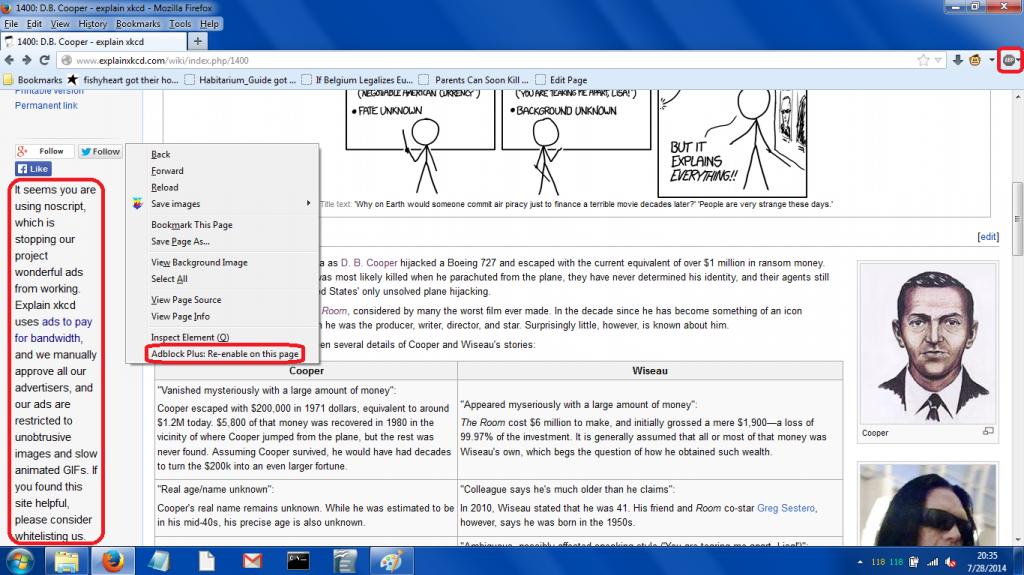


![[5]](http://i.imgur.com/smN1a45.png)
![[6]](http://i.imgur.com/qdpxhdY.png)